Never lose information from site calls again
Your crew already calls the office all day. DeepBuild listens, writes down every problem they mention, and follows each one call after call until it’s sorted.
How it works
-
1
Your crew just calls
One DeepBuild number, from any phone, ringing straight through to whoever they call today: the project manager, the super or the office. No app, no menus, no new habits.
-
2
Every problem, written down
As soon as the call ends, DeepBuild writes up each problem: what, where and how urgent, linked to the exact words. Next week’s call about the same problem updates the same issue.
-
3
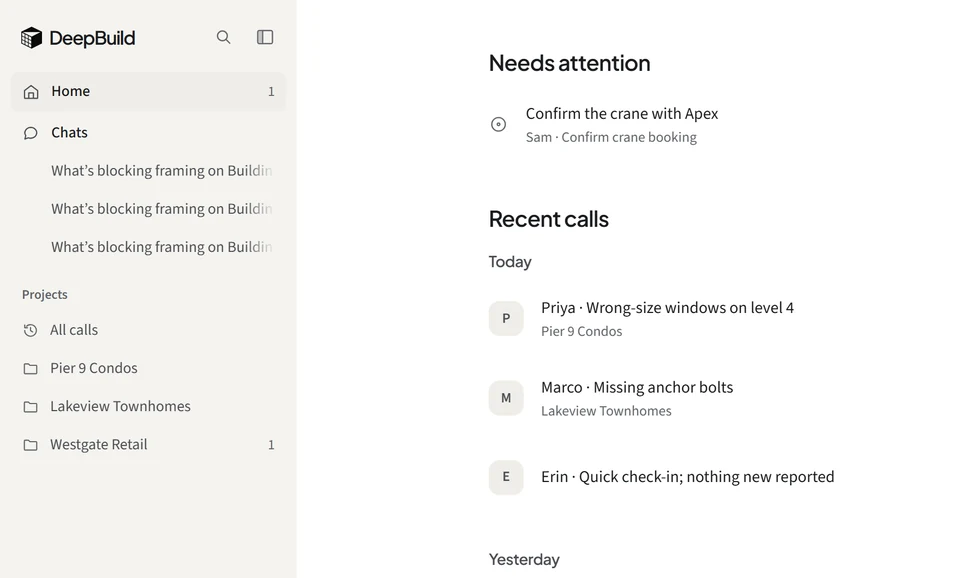
It lands on your device
Calls, transcripts and issues on your DeepBuild dashboard, a report in your inbox after every call, or piped into your own systems.

Try it on one project
Start with one person your crew calls, usually a project manager or superintendent. Your crew won’t notice a thing, except that nobody asks them to repeat themselves.
Pilot request
Dev or Parmeet will reply within 48 hours.
- Length
- 4 weeks
- Who
- One person your crew calls
- Setup
- Usually the same day
Thanks, it’s with us.
Dev or Parmeet will reply within 48 hours.
Questions
Does my crew need to install anything?
No. Site leads call one regular phone number from whatever phone they already use. No app, no account, no menus.
Does the person they call still answer?
Yes. The call rings straight through to them like a normal call. DeepBuild listens and writes it up once the call ends.
Do callers know the call is transcribed?
Yes. Every call starts with a short notice: “DeepBuild transcribes this call to prepare notes.”
Do you keep recordings of the calls?
No. The audio is held in memory only until the transcript is done, then discarded. DeepBuild keeps the transcript and the report, not the recording.
Who can see our calls?
Only the people on that phone line. Each person’s line is private. If your company brings its lines together, it sees each line’s issues and call reports; call notes and full transcripts are shared only if the person on the line chooses to.
Can we delete a call?
Yes. Move it to Trash and it disappears at once. You can restore it for 30 days; after that it’s deleted for good.
Can it connect to the tools we already use?
Yes. Your administrator can create an API key in Settings to bring calls and issues into your own systems.
What does a pilot look like?
Four weeks with one person your crew calls, usually a project manager or superintendent. We usually set up the number the same day, and your crew keeps calling the way they do today.